- What is SmartCrawl Pro?
- Download WPMU DEV SmartCrawl Pro
- How To Install WPMU DEV SmartCrawl Pro?
- How To Set Up WPMU DEV SmartCrawl Pro?
- Other features of SmartCrawl Pro
- Conclusion
SEO (Search Engine Optimization) is one of the most valuable digital marketing practices you can invest in. Whether you run a blog, business website, online store, or manage client sites, doing SEO is essential for long-term visibility, credibility, and growth.
If you run a WordPress website, optimizing for search engines can be time-consuming and complicated.
That’s where WPMU DEV SmartCrawl Pro steps in: a full-featured, professional-grade SEO plugin that aims to make SEO simple, automated, and powerful.
What is SmartCrawl Pro?
SmartCrawl Pro is the premium WordPress SEO plugin developed by WPMU DEV. You can download the free version here.
SmartCrawl handles everything from site audits to metadata, sitemaps, schema markup, social sharing, redirects and more, aiming to give you an all-in-one SEO toolbox directly in your WordPress dashboard.
Download WPMU DEV SmartCrawl Pro
Download the pro version of SmartCrawl for free below. First, register and then log in to start your download.
Every donation helps make advancements…
Donate today and make a difference:
How To Install WPMU DEV SmartCrawl Pro?
To install this plugin on your WordPress website, access your WordPress dashboard first.
On the left menu click on ‘Plugins’. Then, click on ‘Add Plugin’ and next click on ‘Upload Plugin’.
Choose the file you just downloaded and click on ‘Install Now’. On the following screen click on ‘Activate’.
How To Set Up WPMU DEV SmartCrawl Pro?
After installing the plugin you will now see a new option on your WordPress left menu. If you hover on it, a few options will appear:
- Dashboard
- SEO Health
- Title & Meta
- Schema
- Instant Indexing
- Social
- Advanced Tools
- Sitemaps
- Settings
If you click on the dashboard option, a new popup will appear where you can select a few options right away.
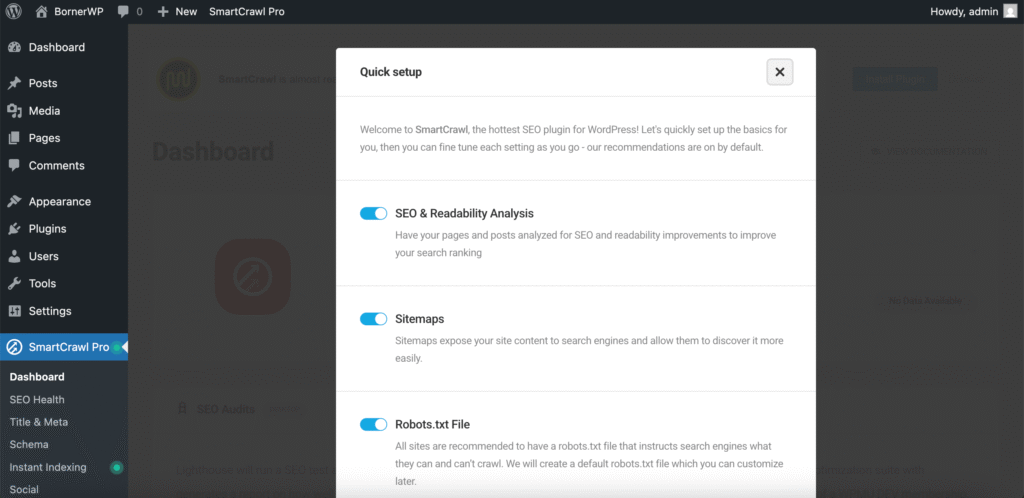
Scroll down and click on ‘Get Started’. You can leave the preselected options as is.
Now on your dashboard you will see many more options. Click on ‘Run Test’ to see what SEO improvements you can do in your site.

This may take a minute or two.
After the test has been completed, you can now start configuring your site and this plugin to get the best of it and improve your rankings in Google and other search engines.
Other features of SmartCrawl Pro
SmartCrawl Pro includes features like automated site crawls or fixes, instant indexing, and white-label reports for clients.
Automated SEO Health Audits & Reports
Scan your site any moment to detect issues such as technical SEO errors, sitemap and URL structure, indexing, schema and more.
Another great feature for agencies or freelancers is the option to generate reports without WPMU DEV branding.
Automatic Sitemaps & Search Engine Notifications
The sitemap created by this plugin automatically includes every post, page or other content type you wish to include in its sitemap. Any sitemap type is included too.
Additionally, SmartCrawl offers also this feature to update and notify search engines about new content or changes on old content.
You can also create different sitemaps for different versions of your site, for example if you have several languages.
Titles, Meta, Social SEO & OpenGraph
Control how your pages appear in search results by editing your titles and meta descriptions.
You can also choose how your content appears in social networks using OpenGraph.
Automatic Internal Linking & Redirects
You can configure SmartCrawl to automatically turn specified keywords into internal (or external) links throughout your site. This helps distribute link equity and improve internal navigation.
And easily create and manage redirects if you change page URLs or restructure your site. SmartCrawl supports advanced redirects, including regex and location-based rules.
Schema & Structured Data
SmartCrawl includes built-in support for many schema.org types:
- Article
- Book
- Course
- Event
- FAQ Page
- How To
- Job Posting
- Local Business
- Movie
- Product
- Recipe
- Software Application
- WooCommerce Product
- Custom Type
Add or customize schema markup without touching code. This helps search engines understand the meaning behind your content, which can improve rich snippet display in search results.
Content Analysis & Readability
While editing a post, SmartCrawl analyzes your content for SEO factors like keyphrase usage (including multiple keyphrases), meta data, image alt attributes, content length, keyword density, and more.
Built-in readability analysis helps make your content more user-friendly and accessible, which is good for both readers and SEO.
WooCommerce & Ecommerce SEO
SmartCrawl includes SEO optimization presets for WooCommerce, helping you optimize product and shop pages with proper metadata, schema, etc.
If you run an online store, this is a big plus, because well-optimized product pages can drive organic traffic and conversions.
White Label & Client Management
For agencies or freelancers, you can remove SmartCrawl branding from reports and code comments and instead use your own branding.
Conclusion
WPMU DEV SmartCrawl Pro stands out as a powerful, all-in-one SEO solution for WordPress users who want automation, advanced control, and professional-grade optimization tools without unnecessary complexity.
As with any SEO tool, the real impact comes from how well it fits your needs, your site structure, and your long-term strategy.
Have you tried WPMU DEV SmartCrawl Pro yet, or are you considering it for your next project? Let me know your thoughts in the comments below!
Leave a Reply